Turn lab notes into a submission-ready paper: hands-on with Google Research's PaperOrchestra
Google Research's PaperOrchestra turns an idea and an experimental log into a submission-ready LaTeX manuscript with five specialised agents. It gained 1,175 stars in a day — this tutorial installs it, feeds it real materials, and shows exactly where the free tier ends.
- What it is: a multi-agent paper-writing framework from Google Cloud AI Research — outline, literature review, section writing, plotting, and refinement agents — Apache 2.0, on GitHub as google-research/paper-orchestra.
- Why it is trending: 1,175 stars gained on November 17, 2026, number 11 on GitHub Trending, 2,923 stars and 408 forks; the arXiv paper (2604.05018) behind it is from April 2026.
- Cost: free and open source. A Gemini API key is required — creating one needs no card, but the default gemini-3.1-pro-preview model is paid-only, so the free tier needs a Flash model. A LaTeX distribution is required; no GPU, no model downloads.
- Verified in this tutorial: the install, the CLI flags, the pre-flight checks, the exact missing-key failure with its three retries, and the Streamlit demo boot (HTTP 200) — all run in our sandbox on November 17, 2026. The generation step itself needs an API key, so it is documented from the project’s source and README, not from a local run.
Google Research has open-sourced the tool that writes the paper for you — or most of it. PaperOrchestra takes two files, an idea and an experimental log, and hands back a submission-ready LaTeX manuscript: outline, literature review with verified citations, figures, full draft, and three rounds of revision against a simulated reviewer. The repository is small — eight commits, no releases, created in May — but on November 17 it gained 1,175 stars in a single day, reached number 11 on GitHub Trending, and now sits at 2,923 stars and 408 forks. The paper behind it (arXiv 2604.05018, from Google Cloud AI Research, submitted April 6, 2026) had been public for months; the code landing on trending this week is what turned a research artifact into a tool people can actually run. This tutorial installs it, feeds it real materials, and shows you exactly where the free tier ends.
What makes it different from the usual "AI writes your paper" pitch is the structure. Most writing assistants polish text you already wrote. PaperOrchestra starts further back: from unconstrained pre-writing materials — a rough idea and a log of what you actually ran — and produces the whole manuscript. Five specialised agents divide the work instead of one giant prompt doing everything, and the literature review is grounded instead of hallucinated: candidate papers are found with Google Search and then checked for existence against the Semantic Scholar API before they reach the bibliography. In the paper's own human evaluation, against autonomous baselines (a single-agent pipeline and Sakana AI's AI Scientist-v2), PaperOrchestra won by an absolute margin of 50–68% on literature-review quality and 14–38% on overall manuscript quality. Those are the authors' numbers, measured against other autonomous systems — not against human authors — and this tutorial treats them that way.
What you'll need#
- Python 3.11 or newer. The README uses a conda environment with Python 3.11; our sandbox ran the install and the CLI on Python 3.12 without issues.
- About 1 GB of free disk for the virtual environment. The minimal dependency set measured 690 MB in our install; the full requirements add Streamlit on top.
- A Gemini API key — or an OpenAI key, or a Vertex AI project (Step 2). Read the cost note in Step 2 before you run anything: the default model is a Pro model, which Google's pricing page lists as paid-only.
- A LaTeX distribution with
pdflatexandbibtex(Step 3). This is a hard requirement, not a nicety: the refinement agent compiles the draft to PDF and refuses to review it if compilation fails. - No GPU, no model downloads. Everything runs against hosted models through API calls.
- Optional: a free Semantic Scholar API key. The literature agent works without one, but the keyless endpoint is rate-limited — our sandbox hit a 429 from a shared IP — so get a key if you plan to run it more than once.
How the pipeline works#
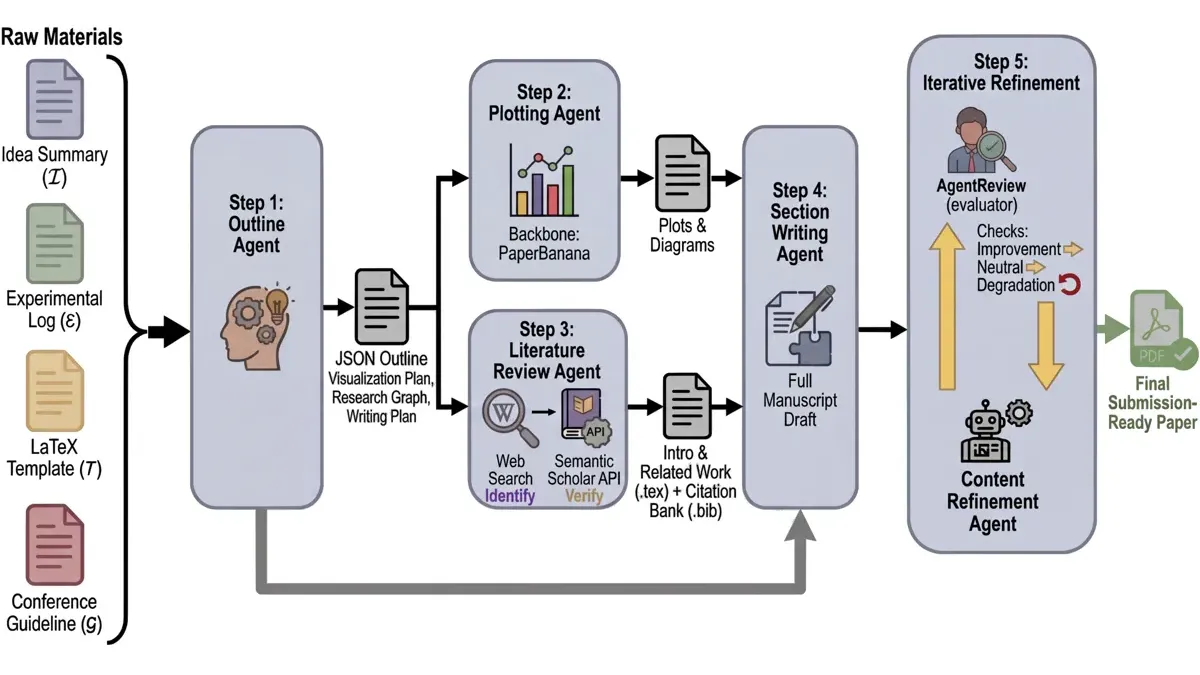
Five agents, in sequence, with two of them running in parallel. The outline agent reads your idea, your experimental log, the LaTeX template, and the conference guidelines, and writes an outline.json — a JSON outline plus a visualisation plan, a research graph, and a writing plan. Then the plotting agent (optional) and the literature review agent run side by side: the plotter generates figures from code, and the literature agent searches for candidate papers, verifies each one through Semantic Scholar, and builds a references.bib citation bank with a citation map. The section-writing agent then drafts the full manuscript into the template, and the content-refinement agent compiles it, reviews it with an evaluator that scores each revision as an improvement, neutral, or a degradation, and revises up to three times. If any stage throws, the whole pipeline retries up to three times before giving up.
Step 1 — Clone and install#
Clone the repository and install the dependencies. The README's path is a conda environment; a plain virtualenv works the same way, and that is what we used in the sandbox:
git clone https://github.com/google-research/paper-orchestra
cd paper-orchestra
python3 -m venv .venv && source .venv/bin/activate
pip install -r requirements.txt
The requirements file lists 16 unpinned packages — google-genai, openai, python-dotenv, requests, rich, pydantic, json_repair, thefuzz, joblib, numpy, matplotlib, PyMuPDF, pymupdf4llm, pypdf, pyOpenSSL, opencv-python, streamlit, and tqdm — so you get the latest versions. Our sandbox install of that set completed and every import the pipeline needs resolved; the only failure we hit was the VM's 512 MB /tmp filling up on the first attempt, fixed by pointing pip's temp directory at a roomier path. Confirm the CLI itself works before going further:
python paper_writing_cli.py --helpYou should see the full flag list: --raw_materials_dir and --latex_template_dir (both required), --output_dir, --idea_filename (default idea_sparse.md), --experimental_log_filename (default experimental_log.md), --writer_model_name, --reflection_model_name, --research_cutoff, --use_plotting, --plotting_model_name, --image_model_name, and --plotting_max_critic_rounds. If --help prints, the install is good.
Step 2 — Get an API key#
Create a .env file in the project root. The keys the README documents are:
GEMINI_API_KEY=your_key_here
# Optional, only if you use OpenAI models instead:
OPENAI_API_KEY=your_key_here
# Optional, raises the Semantic Scholar rate limit:
SEMANTIC_SCHOLAR_API_KEY=your_key_here
# Optional, only for the Streamlit demo's email notification:
SMTP_EMAIL=your_email
SMTP_PASSWORD=your_password
Get a Gemini key at Google AI Studio (aistudio.google.com/apikey): sign in with a Google account, click "Get API key", and you have one. Creating the key needs no credit card — but here is the catch that matters for this project. The pipeline's default model for the writer, reflection, and plotting agents is gemini-3.1-pro-preview, and Google's pricing page lists Pro models as not available on the free tier; the free tier covers Flash-class models. So a free-tier key will fail on the default configuration. You have two honest options: enable billing on the key's project and use the default, or stay on the free tier and point the pipeline at a Flash model with --writer_model_name gemini-3.8-flash --reflection_model_name gemini-3.8-flash (Step 5). Expect the output quality to differ from the paper's Pro-based results if you take the free path — the paper's own literature-discovery step already used a Flash model, but the writing backbone in its evaluation was Pro. One more free-tier condition worth knowing: Google says prompts sent on the free tier may be used to improve its products, except in the EEA, the UK, and Switzerland. The OpenAI alternative is OPENAI_API_KEY plus --writer_model_name gpt-5-2025-08-07, the model the paper used for its GPT comparison; Vertex AI users can set VERTEX_AI_PROJECT and VERTEX_AI_LOCATION instead of a key.
Step 3 — Install LaTeX#
PaperOrchestra compiles its own output. The compile step runs pdflatex, then bibtex, then pdflatex twice more, and the refinement agent bails out with "Initial PDF failed to compile. Cannot review." if the first compile fails — so install a TeX distribution before your first run. On Debian or Ubuntu:
sudo apt install texlive-latex-recommended texlive-latex-extra texlive-fonts-recommended
which pdflatex bibtex
Both commands should print a path. The three packages exist in the Ubuntu archive (TeX Live 2023) and cover what the bundled CVPR and ICLR templates need, including natbib for the bibliography style the templates ship with. If compilation ever complains about a missing package, texlive-full is the no-thinking fallback — several gigabytes, but it ends the argument. On macOS, MacTeX is the equivalent; on Windows, MiKTeX.
Step 4 — Write your raw materials#
The pipeline needs exactly two files. Create a folder — materials/ — with idea_sparse.md and experimental_log.md inside. The shape that works is the one in the repo's own bundled demo, built from a real CVPR 2025 paper: the idea file states the problem, the hypothesis, and the proposed method; the log records the setup, the datasets and splits, the metrics, the baselines, and the results with numbers. Here is the toy example we used for our sandbox test — replace it with your own work:
## Problem Statement
Small vision models deployed on phones lose accuracy on night-time
street scenes because training data is dominated by daylight images.

## Core Hypothesis
Adding a lightweight illumination-normalization adapter before the
frozen backbone will recover most of the night-time accuracy drop
without retraining the backbone.

## Proposed Methodology
Train only the adapter on paired day/night street-scene images,
freeze the backbone, and compare mean IoU on a held-out night-time
split against the unadapted baseline.
## 1. Experimental Setup
- Datasets: CityScapes-Night (2,400 train / 600 test images),
baseline evaluated on the same split.
- Metrics: mean IoU on the night-time test split.
- Baselines: frozen backbone with no adapter.
## 2. Results
- Baseline (no adapter): 41.2 mean IoU.
- With illumination adapter: 58.7 mean IoU.
- Adapter adds 0.4M parameters and 3 ms latency per frame.Two details matter. First, the numbers in the log are what the section-writing agent turns into tables — put real numbers in, with units, and name the baselines exactly; vague logs produce vague tables. Second, figures: if you run without plotting and supply no figures, the CLI warns you that no figures were found and that compilation may fail, because the template still expects them. Either drop your figures into materials/figures/ or turn plotting on (Step 7). The research cutoff defaults to the current month; if you are reconstructing a paper from an older venue, pass --research_cutoff 2024-11 — the month the paper's own CVPR 2025 benchmark used — so the literature agent does not cite work published after your paper's deadline.
Step 5 — Run the pipeline#
From the project root, with your virtualenv active:
python paper_writing_cli.py \
  --raw_materials_dir materials \
  --latex_template_dir templates/cvpr2025 \
  --output_dir ./paper_output \
  --research_cutoff 2026-11
The CLI copies your materials into the output directory, copies the CVPR 2025 template into paper_output/latex_writeup/, warns you if no figures are present, and then prints "Starting Paper Generation (WITHOUT PLOTTING)". From there the four stages run in order — outline, literature review, section writing, refinement — and a finished run prints the final PDF path. A full run is a long series of large model calls; start it, watch the outline land first, and only then leave it alone.
If you skipped the API key, you will meet the failure we reproduced in the sandbox, and it is worth knowing what it looks like so you do not misread it as a bug. The pipeline starts normally — the output directory and the template copy appear — then the outline agent fails with:
ValueError: Either VERTEX_AI_PROJECT/VERTEX_AI_LOCATION or GEMINI_API_KEY
must be set to use Gemini models.
Writeup failed after 3! Stop here.
That is the pipeline telling you, correctly, that no credentials exist. It retries the whole writeup three times and then stops. Fix the .env file and run it again; nothing else needs to change. The same failure mode is how we confirmed the pipeline actually starts: with no key set, our sandbox run got as far as the outline agent's first model call before failing on credentials, which proves the install, the imports, the template copy, and the pre-flight checks all work.
Step 6 — Read the output#
A finished run leaves four things worth reading, in this order. First, paper_output/final_paper.pdf — the deliverable. Second, paper_output/latex_writeup/, which holds the editable template.tex and references.bib behind the PDF; edit here, not in the PDF, if you want to revise by hand. Third, paper_output/outline.json, the plan the outline agent made — read it before you trust the paper, because a wrong outline means a wrong paper. Fourth, paper_output/literature_agent_output/, with the citation map that ties each in-text citation to a verified paper. Check the bibliography first: every entry should trace to a real paper, which is the whole point of the Semantic Scholar verification step. Then check the numbers in the tables against your log, and check the page count against the conference limit — the CVPR guidelines bundled with the template cap the main text at eight pages excluding references.

Step 7 — Optional: plotting mode and the Streamlit demo#
Two optional paths. For figures, add --use_plotting true to the Step 5 command. That starts the plotting agent, which writes plotting code, renders the figures, and critiques its own output for up to three rounds (--plotting_max_critic_rounds, default 3) before the section writer splices them in. The plotting backbone is the project's PaperBanana utility, and the image model defaults to gemini-3-pro-image-preview — override it with --image_model_name if you are on the free tier. For a gentler on-ramp, the repo ships a Streamlit demo:
streamlit run frontend/app.pyIt serves on http://localhost:8501, takes your idea and log in a form, optionally takes a figure, writes the two markdown files for you, and launches the CLI in the background. Our sandbox boot of the demo served HTTP 200. The demo ships with a worked example built from a real CVPR 2025 paper, which is the fastest way to see the input format the pipeline expects. The demo can also email you when a run finishes, if you set the SMTP fields in .env.
When to use this vs alternatives#
| Your situation | Use this | Why |
|---|---|---|
| You have an idea and results, no draft yet | PaperOrchestra | It is built for exactly this input: raw materials in, manuscript out |
| You already have a full draft to polish | An assistive tool (Jenni, Paperpal, SciSpace, Writefull) | Those keep a human in the loop on existing text; PaperOrchestra drafts from scratch |
| You want the system to run experiments too | AI Scientist-v2 | It executes the research loop end to end; PaperOrchestra only writes from materials you supply |
| One big prompt to a chat model | Only for a short note | The paper's own evaluation puts a single-agent baseline well behind the multi-agent pipeline on literature review |
| Anything you will actually submit | PaperOrchestra plus your own review | Google frames it as an assistive tool, not an author — the submission is yours, and so is the responsibility |
What to watch#
Five things before you trust a run. First, the repository is young and thin: eight commits, no releases, and the PaperWritingBench dataset the paper evaluates on is not in the repo — the README says it will be released separately. Second, the headline evaluation numbers compare PaperOrchestra against other autonomous systems, not against human-written papers, so do not read them as "as good as a human". Third, the cost trap in Step 2 is real: the default model is paid-only, and a long multi-agent run on Pro models is the expensive way to discover that. Fourth, the LaTeX compile is load-bearing — a missing TeX package kills the refinement stage, not just the PDF. And fifth, verify the bibliography by hand. Semantic Scholar confirms a paper exists; it does not confirm the citation supports the sentence it is attached to. Read every cited paper you have not read before, and check every number in every table against your log. A generated manuscript with a fabricated citation is worse than no manuscript, because it looks finished.
The takeaway#
PaperOrchestra is the most concrete version yet of a specific idea: that writing a paper is a pipeline — outline, literature, drafting, figures, revision — and that each stage is a separate job done better by a separate agent than by one giant prompt. The 1,175 stars it gained in a day say the idea has an audience; the grounded citations and the public benchmark say it is more than a demo. The honest way to use it is as a drafting engine with a human editor attached: feed it a real idea and a real log, let it produce the manuscript, then verify the citations, the numbers, and the argument yourself. Clone it, set the key, write the two files, and run the command in Step 5 — the paper that comes back is a starting point you can defend, not a submission you can file blind.