Train your own LLM from scratch: hands-on with MiniMind's 64M-parameter model
MiniMind trains a 64-million-parameter language model from scratch for about ¥3 of GPU rental. This tutorial runs the whole pipeline — inference, a tiny pretraining pass, and SFT — on an ordinary CPU, with every command verified.
- The claim, with the fine print: ~¥3 and ~2 hours is the author's measurement for one SFT epoch on one RTX 3090 at ~¥1.3/hour rental — pretraining is the longer stage.
- What you train: 63.91M parameters — 8 layers, hidden size 768, 6,400-token vocabulary, Qwen3-aligned architecture; stock Transformers loads it with no custom code.
- Verified here: the released weights chat fluently in Chinese at 15–21 tokens/s on CPU; a 40-line pretraining demo moved loss 8.73 → 7.79; a 32-line SFT demo produced a loadable checkpoint.
- The demo is the pipeline, not the model: 72 lines of training produce punctuation soup. The full run needs the 1.2 GB and 1.7 GB datasets and a GPU.
- Cost of the full quick path: the data is free; one SFT epoch is ~¥3 of rental; the repository also ships DPO, GRPO, PPO, LoRA, and agent-RL stages.
Most "train your own LLM" guides quietly skip the hard part: they start from a pretrained checkpoint and call the fine-tune the training. MiniMind does the whole thing. It is a 64-million-parameter language model trained entirely from scratch — random weights, raw text, no teacher model — with the complete pipeline (pretraining, supervised fine-tuning, and reinforcement learning) in one repository. It has 65,700 stars on GitHub, and it is on GitHub's daily trending page today. It gained eight stars in the hour I spent verifying this tutorial.
The claim that made it famous is a number: about ¥3 of GPU rental and about two hours to train it. The fine print matters, and the author states it plainly — two hours is the measured time for one epoch of the SFT stage on a single RTX 3090, and ¥3 is the rental cost at roughly ¥1.3 per hour. The pretraining stage is the longer job. But the point stands: this is the cheapest honest "from scratch" recipe on the internet, and every step of it runs on hardware you can rent for the price of a coffee.
This tutorial does two things. First, it runs the released MiniMind-3 weights and chats with them. Second, it runs the actual training scripts — pretraining and SFT — on a small slice of the real data, on an ordinary CPU, so you can watch the loss fall and end up with a checkpoint file you trained yourself. The demo runs are deliberately tiny: they prove the pipeline works end to end. They do not produce a good model, and this tutorial will not pretend otherwise. The full reproduction — the real datasets, the real settings, one rented 3090 — is laid out at the end.
What you'll need#
- Python 3.12 and about 6 GB of free disk for the demo path (a 1.4 GB virtual environment, the 1.2 GB and 1.7 GB dataset files, the 122 MB model, and roughly 700 MB of checkpoints). The full reproduction needs the same plus a GPU.
- No API keys and no accounts. The code, the weights, and the data are all public. The weights are Apache-2.0 licensed.
- A CPU is enough for the demo. I ran every command below on a 4-vCPU virtual machine with 8 GB of RAM. The full run wants one GPU with 24 GB of memory — the author's recipe is a single RTX 3090.
- Patience for downloads, not for builds. Nothing here compiles from source. The install is pip packages and file downloads.
1. Get the code and the weights#
Clone the repository, then fetch the released MiniMind-3 weights from Hugging Face:
git clone https://github.com/jingyaogong/minimind.git
cd minimind
git clone https://huggingface.co/jingyaogong/minimind-3
The weights directory is small — 122 MB for the model file — because the model itself is small. The config confirms what you are dealing with:
python3 -c "import json; print(json.load(open('minimind-3/config.json'))['hidden_size'],
      json.load(open('minimind-3/config.json'))['num_hidden_layers'])"
That prints 768 8: a hidden size of 768 across 8 layers, with a 6,400-token vocabulary and tied input/output embeddings. The config declares model_type: qwen3 and Qwen3ForCausalLM, so stock Transformers loads it with no custom code — MiniMind-3's architecture is aligned to Qwen3. The repository also ships a 198M-parameter Mixture-of-Experts variant with 64M active parameters, if you want the bigger sibling later.
2. Install the stack#
Create a virtual environment and install the stack. Two details matter. First, the repository's requirements.txt comments out torch, so you install it separately. Second, the PyTorch CPU index must be added with --extra-index-url, not --index-url — the latter replaces PyPI entirely and pip then cannot find transformers. I hit exactly that failure before reading the flag properly:
python3 -m venv .venv
source .venv/bin/activate
pip install torch --extra-index-url https://download.pytorch.org/whl/cpu \
  transformers==4.57.6 datasets numpy
That resolved to torch 2.15.0+cpu on the day I ran it, with transformers pinned to 4.57.6 as the repository specifies. Verify the imports before going further:
python -c "import torch, transformers, datasets; print(torch.__version__, transformers.__version__)"Expected output: 2.15.0+cpu 4.57.6 (the torch version will move forward over time; the transformers pin is the one that matters).
3. Chat with the released model first#
Before training anything, run the model the author actually shipped. The evaluation script is interactive — it asks you to pick [0] automatic test or [1] manual input — so pipe 0 in for the scripted run. Cap the generation length, because the default is 8,192 new tokens:
echo 0 | python eval_llm.py --load_from ./minimind-3 --device cpu --max_new_tokens 256Mode 0 runs eight preset prompts. On my 4-vCPU machine the whole auto-test finished in about 90 seconds, at 15–21 tokens per second. The answers are fluent — in Chinese, which is what the model was primarily trained on. Asked "你有什么特长?" ("What are your strengths?"), it replied with a structured list:
💬: 你有什么特长?
🧠: 作为一个AI,我有以下特长:

1. **语言理解与生成**:我能够理解、生成和解释人类语言,包括但不限于中文、英文、日文、法文、西班牙文等。

2. **自然语言理解**:我能够理解自然语言,包括意图识别、实体识别、情感分析、意图理解等,能够进行更准确、流畅的对话。
[Speed]: 15.89 tokens/s
Asked why the sky is blue, it gave a correct, if slightly repetitive, explanation of scattering. A 64M-parameter model will not win any benchmark, but it holds a conversation — and it does it from 122 MB of weights on a CPU with no GPU anywhere in sight.
What you are looking at: the architecture#
The model is a decoder-only Transformer, and the repository's own diagram shows the full stack: tokenizer, input embedding, then eight identical layers, each pairing grouped-query attention (GQA) with a feed-forward network, wrapped in RMSNorm and residual connections, with rotary position embeddings (RoPE) on the queries and keys and a SiLU-gated feed-forward.
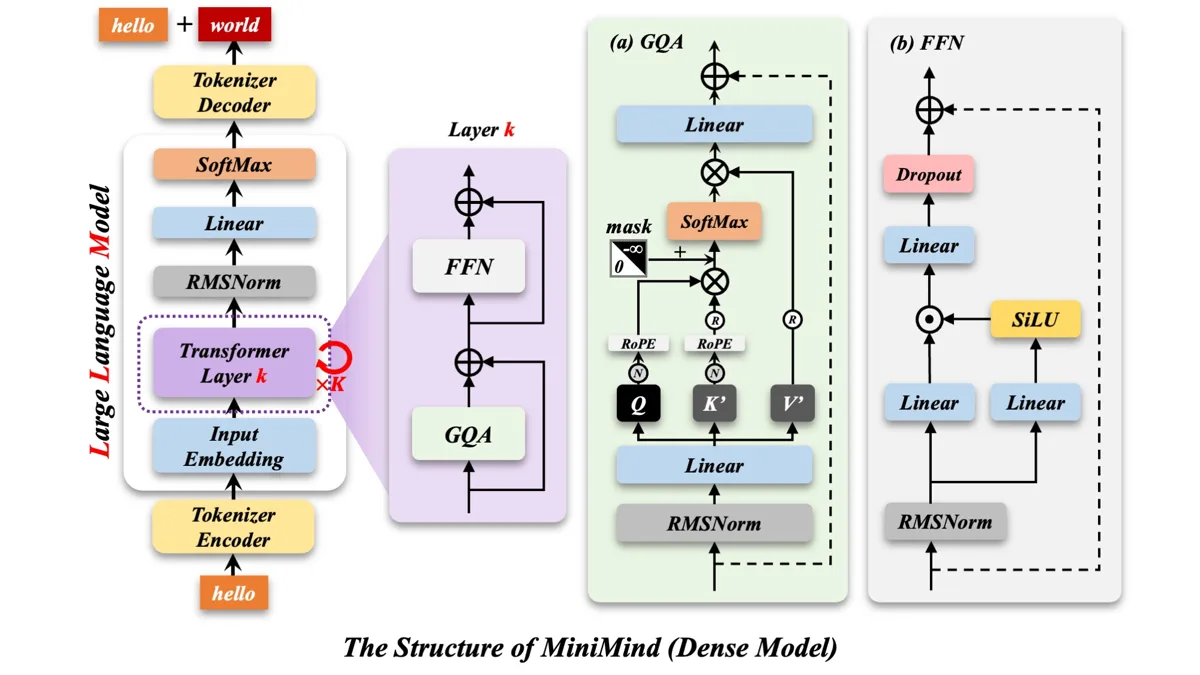
The numbers behind the diagram: 8 attention heads with 4 key-value heads (that is the "grouped" in grouped-query attention — four query heads share one key-value head, which cuts the KV cache), a 32,768-token context window in the config, and 63.91 million parameters in total, as the training scripts report on startup. Nothing here is exotic. That is the point: the architecture is deliberately conventional, so the interesting part is the training recipe, not a novel block.
4. Run a tiny pretraining pass#
Now the part no fine-tuning tutorial can offer: training from random weights. First fetch the data. The quick-start files are pretrain_t2t_mini.jsonl (1.2 GB) and sft_t2t_mini.jsonl (1.7 GB), from the MiniMind dataset on Hugging Face or the ModelScope files page the README points to. Download both into dataset/. The pretraining file is one JSON object per line — {"text": "..."} — and the slice I sampled was mostly Chinese text.
For the smoke test, take the first 40 lines and train on those. The training scripts live in trainer/ and use relative paths, so run them from there:
head -40 dataset/pretrain_t2t_mini.jsonl > dataset/pretrain_small.jsonl
cd trainer
python train_pretrain.py --epochs 1 --batch_size 4 --accumulation_steps 1 \
  --device cpu --num_workers 0 --log_interval 2 \
  --data_path ../dataset/pretrain_small.jsonl
Ten steps at batch size 4, one epoch, on CPU. This is what came back on my machine:
Model Params: 63.91M
Trainable Params: 63.912M
Generating train split: 40 examples [00:00, 19353.12 examples/s]
Epoch:[1/1](2/10), loss: 8.7275, logits_loss: 8.7275, aux_loss: 0.0000, lr: 0.00045703, epoch_time: 2.0min
Epoch:[1/1](10/10), loss: 7.7942, logits_loss: 7.7942, aux_loss: 0.0000, lr: 0.00005000, epoch_time: 0.0min
The loss fell from 8.73 to 7.79 in ten steps — a model learning that text is not uniform noise — and the run wrote out/pretrain_768.pth, a 137 MB state dict. That file is your model: randomly initialized weights, nudged by 40 lines of text. The cosine learning-rate schedule is visible in the lr column decaying toward its floor.
The flags are worth understanding, because you will reuse them. --batch_size 4 and --accumulation_steps 1 shrink the effective batch for a CPU; the author's defaults are batch 32 with 8 accumulation steps on GPU. --num_workers 0 keeps data loading in-process, which is faster on a small VM than spawning workers. --max_seq_len defaults to 340 for pretraining.
5. Run a tiny SFT pass#
Pretraining teaches the model what text looks like. Supervised fine-tuning teaches it to answer. The SFT file is one JSON object per line with a conversations array — user and assistant turns, with a reasoning_content field on the assistant messages. Same pattern: slice 32 lines, run from trainer/, starting from the checkpoint you just made:
head -32 ../dataset/sft_t2t_mini.jsonl > ../dataset/sft_small.jsonl
python train_full_sft.py --epochs 1 --batch_size 2 --max_seq_len 512 \
  --accumulation_steps 1 --device cpu --num_workers 0 --log_interval 2 \
  --data_path ../dataset/sft_small.jsonl
The script defaults to --from_weight pretrain, so it picks up out/pretrain_768.pth automatically, and saves out/full_sft_768.pth at the end. Two things I learned running this. First, the default batch size of 16 at 768 tokens is too much for an 8 GB machine — my first attempt was killed by the out-of-memory killer before the first loss line. Batch 2 with --max_seq_len 512 completed all 16 steps in about four minutes:
Epoch:[1/1](14/16), loss: 7.4261, logits_loss: 7.4261, aux_loss: 0.0000, lr: 0.00000134, epoch_time: 0.0min
Epoch:[1/1](16/16), loss: 7.5172, logits_loss: 7.5172, aux_loss: 0.0000, lr: 0.00000100, epoch_time: 0.0min
Second, the SFT loss hovers around 7.4–7.5 rather than falling steeply. That is expected: sixteen steps on 32 conversations cannot teach instruction-following. The value of this run is the artifact — a checkpoint that loads, in the exact format the evaluation script expects — not the loss curve.
6. Chat with the model you just trained#
Point the evaluator at the model/ directory and tell it which weight to load:
cd ..
echo 0 | python eval_llm.py --load_from ./model --weight full_sft \
  --device cpu --max_new_tokens 64
When the load path is ./model, the script builds a fresh MiniMind from the architecture in model/ and loads out/full_sft_768.pth into it. It ran cleanly — exit code 0, all eight prompts answered — and the answers were exactly what 72 lines of training should produce:
💬: 为什么天空是蓝色的
🧠: ,。动的,。在。是。
,。,,,。,,、的是。。。。。和:,,,,
[Speed]: 30.29 tokens/s
Punctuation soup. That is the honest result, and it is the most useful line in this tutorial: it shows the difference between running the pipeline and training a model. The pipeline works — the model loads, generates, and stops. The model itself needs the full datasets and the full schedule, which is the next section.
The full reproduction: what the author actually ran#
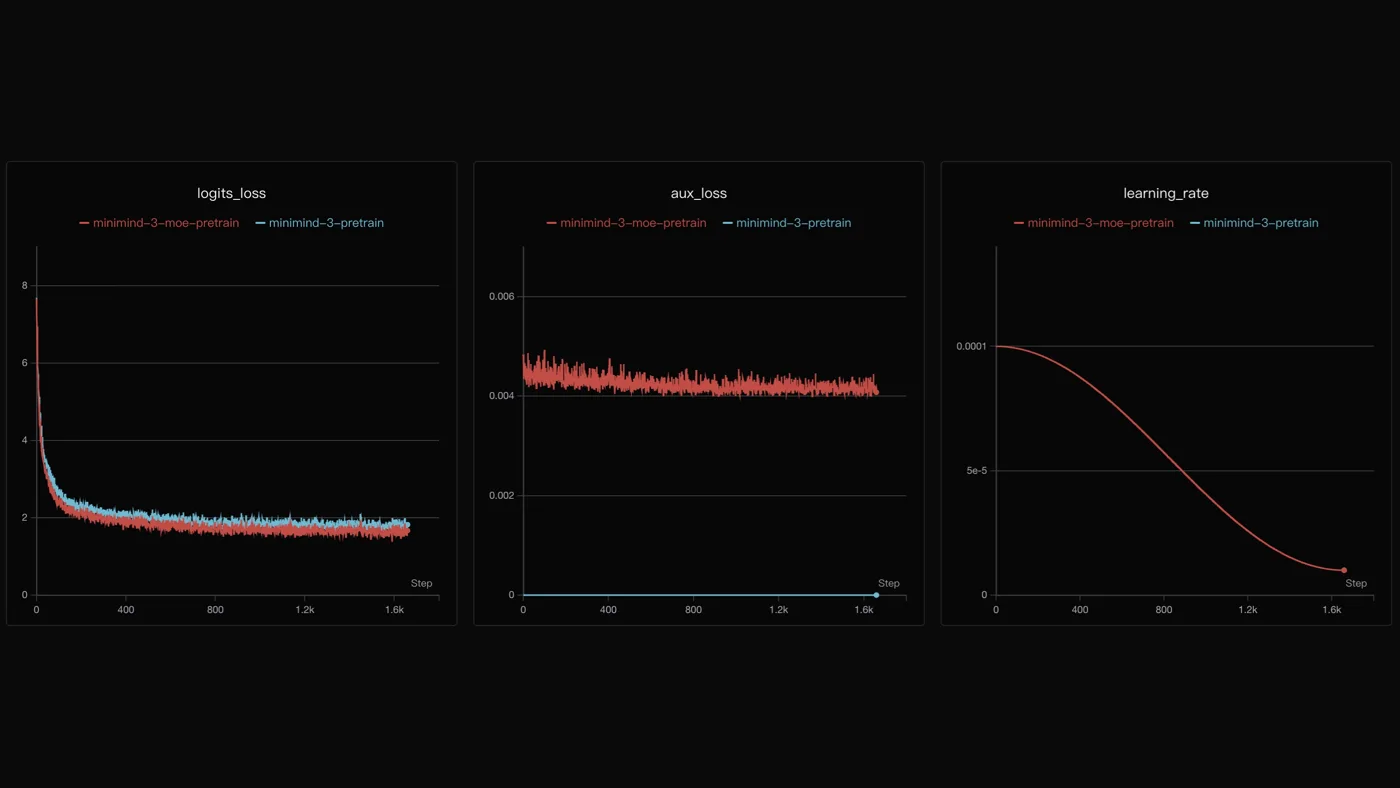
Drop the demo flags and the scripts run their defaults against the full mini datasets: pretraining at 2 epochs, batch 32, sequence length 340; SFT at 2 epochs, batch 16, sequence length 768. The author's own pretraining curves show why the full run matters — the dense model's loss falls from about 7.7 to about 1.8 over roughly 1,600 steps, with the MoE variant tracking just below it:
The full recipe, as the README documents it, is: download the two mini datasets, run train_pretrain.py, then train_full_sft.py from trainer/, and you have "MiniMind Zero", the dialogue model. After that the repository keeps going — train_dpo.py and rlaif.jsonl for preference optimization, train_grpo.py and train_ppo.py for reinforcement learning, train_agent.py with agent_rl.jsonl for agentic tool use, and train_lora.py for cheap adaptation. The SFT stage already carries basic tool-call ability, and the repo ships a chat API script and a ModelScope online demo if you want to try the finished model before training your own.
Cost it honestly. The data is free. One SFT epoch on a single RTX 3090 is the author's measured two hours, about ¥3 at typical rental rates. Pretraining is the longer stage, and the author's reference hardware is eight 3090s with 128 GB of RAM — but the quick path is designed for one card. If you rent a single 3090 for a weekend, the whole reproduction is a few dollars.
When to use MiniMind vs the alternatives#
| Approach | Use it when | Watch out for |
|---|---|---|
| MiniMind | You want the complete from-scratch pipeline — pretrain, SFT, RL — in one repo, with a measured cheap recipe | 64M parameters caps capability; the released model is strongest in Chinese |
| nanoGPT | You want the smallest possible educational trainer to read end to end | It is a teaching codebase, not a full pipeline with SFT and RL stages |
| Fine-tune a small pretrained model (e.g. SmolLM, Qwen2.5-0.5B) | You need a working small model fast and don't care how it was pretrained | You inherit someone else's data and tokenizer; you learn fine-tuning, not training |
| Full-scale pretraining frameworks | You are training at billion-parameter scale with a cluster | Massive overkill for learning the pipeline or for a 64M model |
The deciding question is what you want to learn. If the goal is a capable small model for a product, fine-tune a pretrained checkpoint — it is faster and the result is better. If the goal is to understand what "training an LLM" actually consists of, or to pretrain on your own data from a blank slate, MiniMind is the only project that hands you the entire ladder, from random weights to a chatting model, for the price of a coffee.
Troubleshooting#
pipcannot findtransformers. You used--index-urlfor the PyTorch wheel index, which replaces PyPI. Use--extra-index-urlso PyPI stays available.- The training run ends with a
torch.saveiostream error — butout/*.pthexists. The run saved your weights, then failed writing the resume checkpoint, which is roughly 700 MB (model plus optimizer state). Free disk space and re-run, or just use the weight file inout/— it is complete and loads fine. - SFT dies with exit code 137 and no loss lines. The out-of-memory killer took it. On an 8 GB machine, use
--batch_size 2 --max_seq_len 512for the demo; the author's defaults (batch 16, 768 tokens) assume a GPU. - The model answers in Chinese. That is the training data, not a bug. The pretraining corpus is predominantly Chinese, and the evaluator's preset prompts are Chinese. Ask in Chinese for the best answers; the model does handle English, just less fluently.
eval_llm.pywaits at a prompt. It is interactive by design. Pipe inecho 0for the automatic test orecho 1for manual chat.
The takeaway#
MiniMind earns its 65,700 stars by removing every excuse between you and training a language model. The code is one repository, the data is two public files, the weights are 122 MB, and the cheapest full run costs about ¥3. I ran the entire pipeline on a CPU with no GPU: the released model chats fluently at 15–21 tokens per second, a 40-line pretraining demo moved the loss from 8.73 to 7.79, a 32-line SFT demo produced a loadable checkpoint, and the trained model answered with punctuation soup — exactly as 72 lines of training deserves. The demo proves the machinery. The full datasets and one rented 3090 are what turn the machinery into a model. Start with the demo on your laptop tonight; rent the GPU for the real run when you are ready to see what it can actually do.
Sources#
- MiniMind on GitHub — repository, README, training scripts, architecture diagram, and loss curves (Apache-2.0)
- MiniMind-3 weights on Hugging Face — the 64M dense model used in this tutorial
- MiniMind dataset on Hugging Face — pretraining and SFT files, including the mini splits
- MiniMind online demo on ModelScope — try the finished model without installing anything
Frequently asked questions
Can I really train an LLM from scratch on a CPU?
You can run the whole pipeline on a CPU — I did, on a 4-vCPU machine with 8 GB of RAM. What you cannot do on a CPU is train a good model: the demo runs use 40 and 32 lines of data and produce a checkpoint that generates punctuation soup. A good model needs the full 1.2 GB and 1.7 GB datasets and a GPU; the author's measured cost for one SFT epoch on a single RTX 3090 is about two hours and ¥3 of rental.
How much disk space does the full reproduction need?
About 6 GB for the demo path: a 1.4 GB Python environment, the 1.2 GB pretraining file and 1.7 GB SFT file, the 122 MB weights, and roughly 700 MB for the resume checkpoint the training scripts write at the end of each epoch. Keep a gigabyte free beyond that — if the disk fills mid-save, the weight file in out/ is still saved and usable, but the resume checkpoint fails.
Is MiniMind's released model any good?
For a 64M-parameter model, yes — it holds a coherent conversation in Chinese at 15–21 tokens per second on a CPU. It will not compete with a billion-parameter model on knowledge or reasoning, and it is strongest in Chinese, which dominates its training data. Treat it as a working demonstration of the pipeline, not as a production chatbot.