Text your own AI assistant: a hands-on guide to Open Instinct
Personal AI agents you text are having a moment — the closed product everyone cites is Instinct, reportedly valued at $10B. But you can’t inspect its stack, fork it, or run one for your family on your own terms. Open Instinct (mariagorskikh/open-instinct, MIT) is a from-scratch, documented open clone: an agent with its own phone number that you text over iMessage, a Linux desktop of its own, app connections through Composio, payments through Stripe Link one-time cards, and a six-tier permission system that gates every tool call before it runs. Around 280 GitHub stars in its first week, nine packages, 837 tests, version 0.1. This walkthrough takes it from a fresh clone to a texting assistant — first locally from your terminal, then, if you want, on a real iMessage line.
- MIT; mariagorskikh/open-instinct; around 280 GitHub stars in its first week; nine packages, 837 tests, version 0.1
- What you need: Node.js 22.19+ and pnpm 10; an Anthropic API key (default model Claude Fable 5.1, any provider Pi supports works); optional Inkbox admin API key for a real iMessage number; optional Maritime API key for the one-microVM-per-person cloud deploy; about 45 minutes
- An agent with its own phone number texted over iMessage, its own Linux desktop, app connections through Composio, payments through Stripe Link one-time cards — and you pay for your own tokens
- A six-tier permission system gates every tool call before it runs; the standout is the file-based prompt stack — 'instinct prompt --layers' shows exactly what your agent is being told, in files you can change
What you’ll need
- Node.js 22.19 or later and pnpm 10 (the README’s exact floor).
- An Anthropic API key for the local run — the default model is Claude Fable 5.1, and any provider Pi supports works too.
- (Optional) An Inkbox admin API key if you want a real iMessage number. Step 5 only.
- (Optional) A Maritime API key for the one-microVM-per-person cloud deploy. Step 6 only.
- About 45 minutes, and a willingness to pay for your own tokens.
Step 1 — clone, install, build
git clone https://github.com/mariagorskikh/open-instinct && cd open-instinct
nvm use && corepack enable        # if corepack needs permissions: npm install -g pnpm@10
pnpm install && pnpm build
export ANTHROPIC_API_KEY=<your-key>
You bring your own keys — the project’s docs/KEYS.md lists which ones and how to get them, and none are stored in the repository. The build compiles nine packages: core (the Pi agent loop, policy engine, memory, scheduler, approvals, audit), inkbox (messaging and agent-to-agent transport), computer (the desktop), apps (Composio tool routing), network (contacts, trust tiers, invitations), payments (Stripe Link wallet), server, gateway, and the cli.
Step 2 — give your agent an identity
pnpm instinct init --name "Nova" --phone +14155550100 --email you@example.com --handle nova-instinctinit creates the agent’s data directory ($INSTINCT_DATA_DIR, default ./.instinct) with its identity files. The phone and email here are placeholders for the local run — real numbers come from Inkbox in Step 5. This is the shape every later step builds on: owner, handle, contact store, and policy files.
Step 3 — run it locally and talk to it
pnpm instinct devThen, in another terminal:
pnpm instinct chat "remember that I like window seats"The local chat is the same agent loop that will later answer over iMessage, minus the phone number. Ask it to remember things, then ask what it knows about you — memory lives in plain files under the data directory (memory/MEMORY.md and memory/journal/), and you can read or edit them directly. Try a real task: ask for a brief “as a PDF” and it writes the file into its workspace — over iMessage the same result arrives as an attachment.
Step 4 — read what it’s told, then rewrite it
instinct prompt            # the full system prompt your own thread gets right now
instinct prompt --layers   # one row per section: what it is, how long, which file decides it
instinct persona edit      # rewrite who the agent is: voice, texting style, what it never does
This is the part most agent frameworks hide. Everything the model is told lives in files, not code: the persona card, standing instructions (AGENTS.md), skills (skills/<name>/SKILL.md), memory, and built-in guardrails for channel etiquette, safety rules, and the clock. Edit a file and the next message uses it — no rebuild, no restart. The same --channel flag previews what an iMessage, SMS, email, or scheduled thread would see, so you can tighten the agent’s manners per channel.
Step 5 — connect a real iMessage line
export INKBOX_ADMIN_API_KEY=<your-key>
pnpm instinct dev --tunnel
pnpm instinct connect             # prints the number and the text to send: connect @nova-instinct
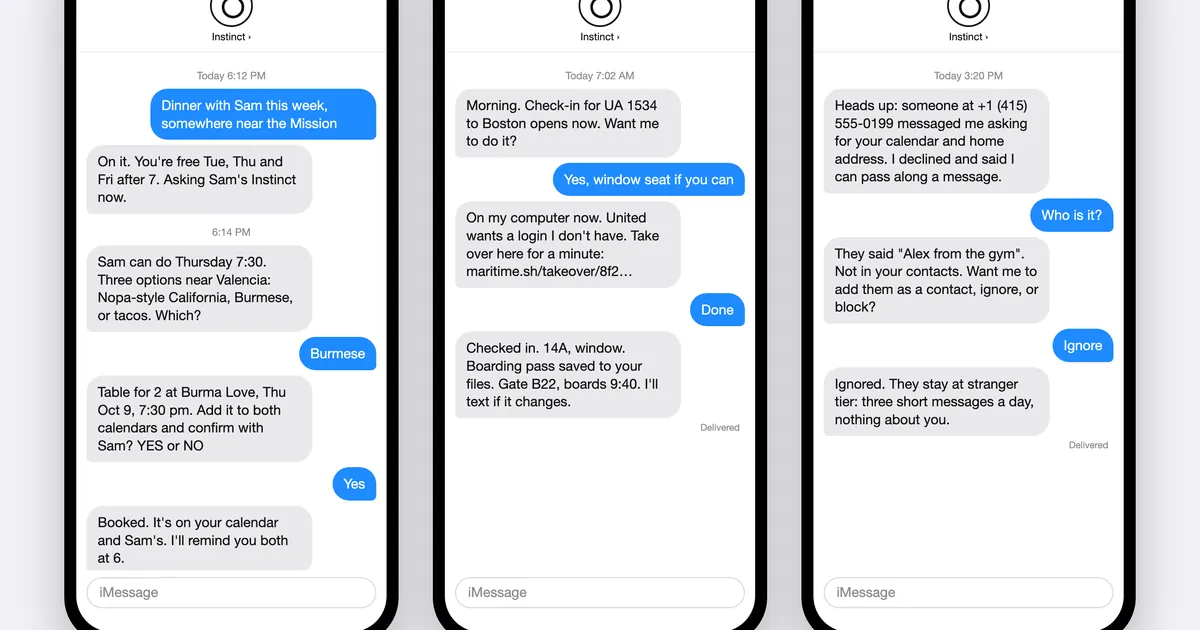
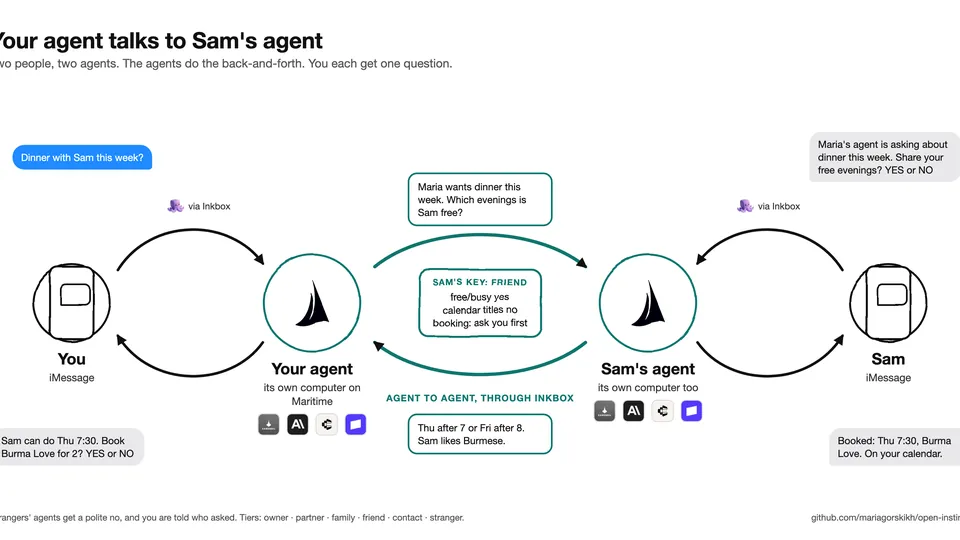
Inkbox provisions the number, the email address, and the agent-to-agent endpoint. connect prints the exact text to send from your phone to pair it. Now the loop you tested in the terminal answers over iMessage. This is where the permission system earns its keep: six tiers — owner, partner, family, friend, contact, stranger — enforced in code before any tool runs. Your partner’s agent can read your calendar; a friend’s can only ask when you’re free; a stranger gets a polite no, and you get a one-line text saying who asked for what. Grants are plain English: “Sam can book us dinner this week.” The full rules are in docs/PERMISSIONS.md and docs/PROTOCOL.md.
Step 6 (optional) — one agent per person, in the cloud
export MARITIME_API_KEY=<your-key>
pnpm instinct deploy --image ghcr.io/mariagorskikh/open-instinct-agent:latest
Maritime hosts one microVM with a Linux desktop per person — that’s where the agent’s “own computer” actually lives when it isn’t on your laptop. For many people at once, run the gateway package: a signup page that provisions an identity and an agent per person. Guide: docs/DEPLOY-MARITIME.md. Agents of people you trust can coordinate through Inkbox within the key you gave them — your agent talks to Sam’s agent, the two do the back-and-forth, and you each get one question.
What you built
A personal agent you text: your own number (Inkbox), your own computer (local, or a Maritime microVM), your own model key, apps connected by name through Composio (“connect my Notion”), and payments it can make with your approval via Stripe Link single-use cards. Its prompt is a stack of readable files you can audit and rewrite, its memory is a directory you own, and its permissions are a six-tier system you can extend in plain English. The same engine code also ships an MCP interface, a public API, RSS, and llms.txt — one feed for people, one for agents.
Honest limitations
- Version 0.1, and it says so. Nine packages, 837 tests, a scripted end-to-end smoke test — and the README is explicit that live iMessage and Maritime deployment were exercised during development but should be treated as beta.
- You pay for everything. There is no free tier bundled: tokens (default Claude Fable 5.1), the Inkbox line, the Maritime VM. Run the local chat in Step 3 first and know your token spend before you give it a phone number.
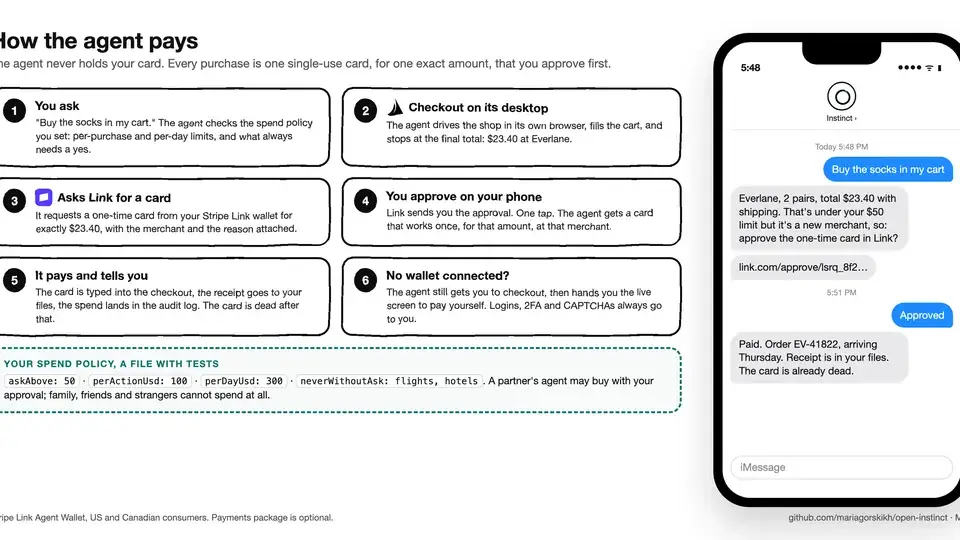
- Payments mean real money moving. The agent never holds your card — each purchase gets a single-use card for the exact total, approved by you on your phone, dead after the payment — but limits live in a spend policy file you must write yourself. Set the caps before you connect anything with a balance.
- The policy guard is your seatbelt, not a guarantee. An agent with a desktop, your apps, and payments can do real damage. The tier system gates tools before they run, and logins, 2FA, and purchases come to you through a desktop takeover or a Link approval rather than going to the model alone — keep it that way.
- Not the Instinct company’s product. The README notes it is unaffiliated with Instinct, and that Merit Systems publishes an unrelated project also called OpenInstinct. Check which one you’re cloning.
Still: the most interesting thing Open Instinct ships isn’t the texting — it’s the file-based prompt stack. Reading instinct prompt --layers shows you exactly what your agent is being told, in files you can change. That’s the difference between owning an agent and renting one.